
I've built a virtual museum with nearly every operating system you can think of
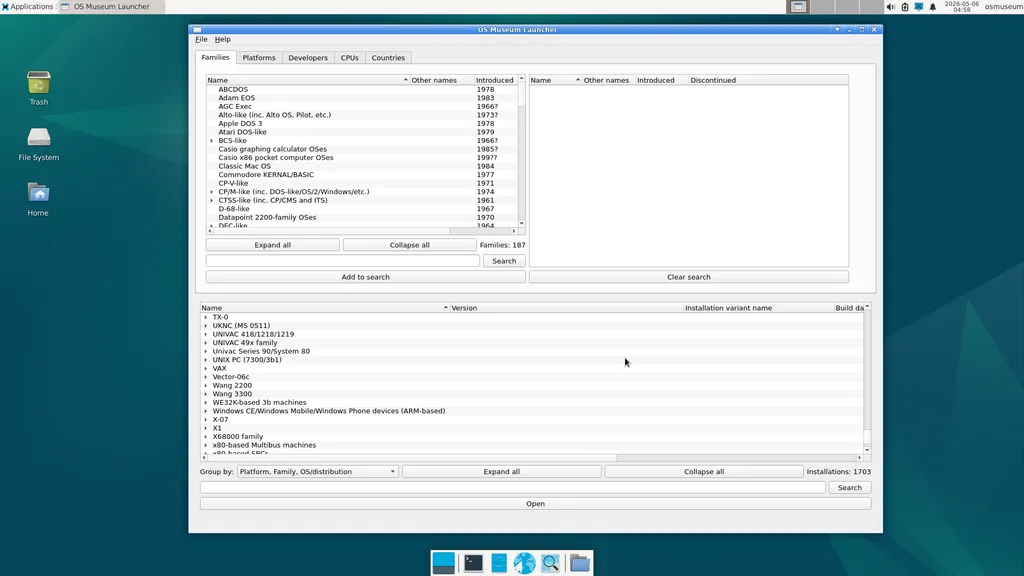
The Virtual OS Museum is a comprehensive virtual collection of operating systems and applications that can be run under emulation. It includes a wide range of historical and modern operating systems, all pre-installed and configured for easy access. Users can explore over 570 distinct operating systems from 1948 to the present day without the hassle of installation or configuration.
- ▪The museum features more than 1700 installations and covers over 250 platforms.
- ▪It includes operating systems from the earliest mainframes to modern personal computers and mobile systems.
- ▪Both full and lite versions of the museum are available for download, with automatic updates supported.
2 outlets in our directory ran this story, first to last over 33 hours. All of the coverage we found sits in one bucket: centre. That one-sidedness is itself worth noticing.
- ▪ A virtual museum runs 570 operating systems in your browser — Boing Boing
Hacker News (Front Page) files mainly under programming. We currently carry 996 of its stories. Top-voted stories on Hacker News.
Story provenance
Source · retrieval · rights · ranking — open for full record
inspect →
Story provenance
Attribution is not the same as permission. This drawer separates discovery metadata, excerpts, WeSearch-generated summaries, reuse status, and whether the publisher receives the visit. Nothing here claims a legal grant the publisher has not made.
Record
| Original publisher | The Virtual OS Museum |
| Canonical URL | https://virtualosmuseum.org/ |
| Publication time | Tue, 19 May 2026 15:53:38 +0000 |
| Retrieval time | 2026-05-19T16:04:57.772Z |
| Last seen | 2026-05-19T16:04:57.772Z |
| Headline source | Publisher (no WeSearch rewrite) |
| Excerpt source | publisher body |
| Excerpt method | First ~120 words (~800 chars) of extracted publisher body, fair-use limited. |
| Summary | WeSearch · cerebras-chat (WeSearch summarizer) |
| Summary source text | contentText |
| Citation coverage | Summary is a WeSearch-generated derivative; primary citation is the original publisher URL. |
| Cluster | XyCwKSsWCx0I · 2 stories |
| Cluster logic | Grouped by semantic title/content similarity across sources within a rolling window. Same-publisher template collisions are excluded from coverage comparison. |
| Ranking reason | Story pages are not engagement-ranked. Hub feeds use recency, with optional source-diversified chronological ordering (cap consecutive stories per source). No personalized ranking. |
| Publisher visit | Yes — open original |
| Substitutes article? | No — link-out required for full text |
Rights status (four layers)
WeSearch handling by dimension
| Indexing | May the item be indexed (stored, ranked, made findable)? | Allowed |
| Snippet | May a short excerpt of the publisher's text be shown? | Allowed |
| AI summary | May WeSearch generate its own short summary of the article? | Limited |
| Retrieval / RAG | May the content be exposed for third-party retrieval-augmented generation? | Not asserted |
| Model training | May the content be used to train AI models? | Not asserted |
| Commercial reuse | May the content be reused commercially? | Not permitted |
Basis: Derived from the published RSS/Atom feed. Contact: [email protected]. Reviewed: 2026-07-24.
Opening excerpt (first ~120 words) tap to expand
The Virtual OS Museum This is a virtual museum of operating systems (and standalone applications) running under emulation, implemented as a Linux VM for QEMU, VirtualBox, or UTM. A custom emulator-independent launcher is provided, and all OSes and emulators are pre-installed and pre-configured. The launcher includes a snapshot feature to quickly revert broken installations back to a working state. Hypervisor installers and shortcuts to run the VM on Windows, macOS, and Linux are also included.
…
Excerpt limited to ~120 words for fair-use compliance. The full article is at The Virtual OS Museum.
Discussion
0 commentsMore from The Virtual OS Museum